Meeting Planner
Find the working-hours overlap across up to 8 cities and add it to your calendar.
The meeting planner at setalarmclock.net draws each city’s day as a 24-hour strip and highlights the hours where everyone is working — so finding a slot that suits New York, London, and Berlin is something you can see, not calculate.
It even auto-suggests the best time in the next seven days, and once you’ve found a slot you can add it straight to Google Calendar, Outlook, or download an .ics file.
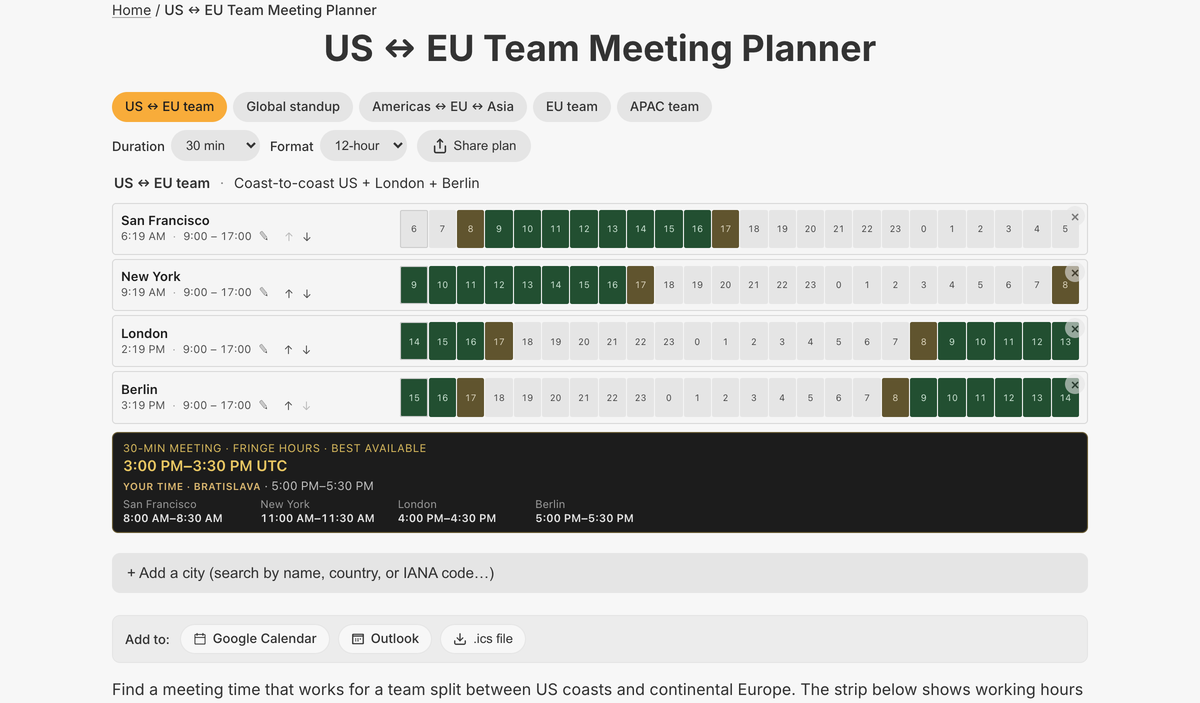
What the full meeting planner does
- Per-city 24-hour strip: green working hours, yellow ±1h fringe, highlighted overlap columns
- Best-time auto-suggest — the earliest slot in the next 7 days where all cities overlap
- Editable working hours per city; up to 8 cities via typeahead search
- 5 named team presets (US↔EU, Global standup, Americas↔EU↔Asia, EU, APAC)
- Meeting duration selector (15–240 min) and 12h/24h toggle
- Add to Calendar: Google, Outlook, and .ics download; shareable link
This is the hardest tool to fake with mental math, and the full page is where it shines — editable hours, calendar export, presets, and a shareable plan. The embed previews the overlap; the tool page plans the meeting.
The overlap logic is genuinely helpful: working hours are shaded green, a one-hour buffer on each side is shaded yellow, and the columns where everyone is simultaneously working are highlighted — so a workable slot is obvious at a glance.
Common use cases
- Scheduling across a distributed team
- Coordinating a synchronized launch
- Client calls spanning continents
- Remote-work handbooks and onboarding
- Planning interviews across time zones
How to use the meeting planner
- 1
Start from a team preset or add your cities (up to 8).
- 2
Set each city’s working hours and the meeting duration.
- 3
Read the highlighted overlap and the suggested best time.
- 4
Add the slot to Google, Outlook, or download an .ics file.
More free tools on Set Alarm Clock
Set Alarm Clock is a whole suite of free time tools. If the meeting planner is useful, you’ll probably want these too:
Bonus feature
Have a website? Embed this widget
Beyond the full tool, setalarmclock.net lets you drop a working meeting planner straight onto your own site. The example below is just one ready-made configuration, shown running live (embedded from setalarmclock.net onto this page). To build your own — set the time, theme, size and more — use the free embed builder and copy the code it generates.
Powered by setalarmclock.net
<div style="max-width:500px;margin:0 auto;">
  <iframe src="https://embed.setalarmclock.net/embed/meeting-planner/c/eyJ2IjoxLCJ0enMiOlsiQW1lcmljYS9OZXdfWW9yayIsIkV1cm9wZS9Mb25kb24iLCJFdXJvcGUvQmVybGluIl0sImR1cmF0aW9uTWluIjo2MCwiZm9ybWF0IjoiMjRoIiwidGhlbWUiOiJkYXJrIiwiYmciOiJ0cmFuc3BhcmVudCJ9" width="100%" height="520" frameborder="0" scrolling="no" title="Meeting planner comparing New York, London, and Berlin" style="border:0;max-width:100%;" loading="lazy"></iframe>
  <p style="text-align:center;font-size:12px;margin-top:4px;color:#666;"><a href="https://setalarmclock.net/meeting-planner" target="_blank" rel="ugc noopener">Powered by setalarmclock.net</a></p>
</div>
Keep the “Powered by” credit — it’s the attribution link back to setalarmclock.net.
This snippet is one example. Change the settings and generate your own on the embed builder.
Frequently asked questions
How does it pick the best meeting time?
It scans the next 7 days at 15-minute granularity for the earliest slot where every city is within its working hours, falling back to a fringe overlap if no strict one exists.
Can I set each city’s working hours?
Yes. Working hours are editable per city, with a one-hour “fringe” on each side shown in yellow.
Can I add the meeting to my calendar?
Yes. The suggested time exports to Google Calendar, Outlook, or an .ics download.
Ready to use the meeting planner?
Open the full, free tool on setalarmclock.net — no account, no download.